本文版权归作者所有,欢迎转载,但未经作者同意必须保留此段声明,且在文章页面明显位置给出原文连接,否则保留追究法律责任的权利。
转载自夜明的孤行灯
本文链接地址: https://www.huangyunkun.com/2016/03/11/create-project-information-endpoint/
Spring Boot中的Endpoint可以提供很多便利信息,但是有时候自带的信息不能满足需要,就需要我们自己创建一个Endpoint。
对于一个项目而言我们希望能够了解到一些基本的信息,比如项目的构建环境,git仓库信息,CI的build number等等。
Netflix的nebula项目提供了很多gradle的插件,而搜集信息我们可以使用gradle-info-plugin。
buildscript {
    repositories { jcenter() }
    dependencies { classpath 'com.netflix.nebula:gradle-info-plugin:3.+' }
}

apply plugin: 'nebula.info'
这样在gradle构建项目的时候就会自动搜集信息,并存储在Properties文件中。这样就可以自定义一个Endpoint来展示这些信息。
import com.google.common.collect.Maps;

import org.slf4j.Logger;
import org.slf4j.LoggerFactory;

import org.springframework.boot.actuate.endpoint.AbstractEndpoint;

import org.springframework.stereotype.Component;

import java.io.IOException;
import java.io.InputStream;

import java.util.HashMap;
import java.util.Map;
import java.util.Properties;


@Component
public class VersionEndpoint extends AbstractEndpoint<Map<String, Object>> {
    private Logger logger = LoggerFactory.getLogger(this.getClass());

    public VersionEndpoint() {
        super("version", false);
    }

    @Override
    public Map<String, Object> invoke() {
        HashMap<String, Object> maps = Maps.newHashMap();
        InputStream inputStream = this.getClass().getClassLoader()
                                      .getResourceAsStream("META-INF/{项目名字}.properties");

        try {
            Properties properties = new Properties();
            properties.load(inputStream);

            for (Map.Entry<Object, Object> entry : properties.entrySet()) {
                maps.put(String.valueOf(entry.getKey()), entry.getValue());
            }
        } catch (IOException e) {
            logger.error("Error when process file", e);
        }

        return maps;
    }
}
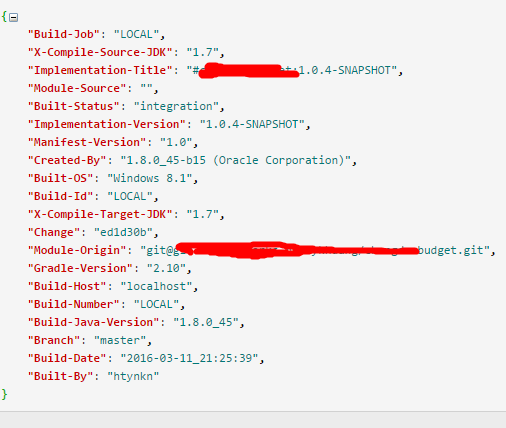
这样我们访问/version时就可以看到类似这样的输出
参考资料
https://github.com/nebula-plugins/gradle-info-plugin
本文版权归作者所有,欢迎转载,但未经作者同意必须保留此段声明,且在文章页面明显位置给出原文连接,否则保留追究法律责任的权利。
转载自夜明的孤行灯
本文链接地址: https://www.huangyunkun.com/2016/03/11/create-project-information-endpoint/
你好
我应该称呼你为学长吗?我是电子信息工程专业一名大三的学生,目前对于未来规划和职业方向还很迷茫,看了你的文章觉得你一定是一名出色的人,希望可以得到你的一些指导。雷涛