SpringXD是Pivotal的大数据产品,提供了一个抽象的数据处理平台。
SpringXD将数据解决方案抽象为数据吸纳,分析,流调度和输出四大块。
作为源头的数据吸纳可以从各种数据源中获取需要的数据,基于Spring的另外一个项目spring-integration,这一部分的大部分实现都可以使用简单的dsl实现。
在SpringXD中每一个部分的组件都可以自己编写并注册到服务中,方便之后的使用。
但是在编写阶段每次都需要打包,上传服务器,然后注册,整个过程还是有点繁琐的。
Gradle作为一个构建工具,自然可以通过自定义任务完成这个任务。
微博数据吸纳
这里以微博的数据源为例。
微博的数据源因为新浪微博提供了sdk,所以自己编写稍微方便一些。
SpringXD项目默认也提供了twitter的两个source方便测试。
先看一下build.gradle的配置
ext {
xdVersion ='1.1.1.RELEASE'
springVersion ='4.1.3.RELEASE'
moduleType ='source'
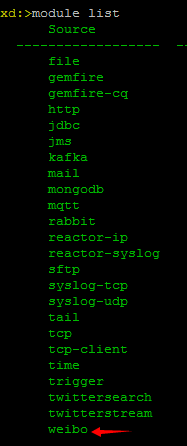
moduleName ='weibo'
xdServer ="http://192.168.0.12:9393"
version ='0.0.1-SNAPSHOT'
}
最关键的配置变量是moduleType,moduleName和xdServer。
为了简单明了,WeiboSource并不具有配置参数(一般情况下都需要提供一些配置参数的,比如apiKey),主配置文件如下
<?xml version="1.0" encoding="UTF-8"?>
<beans:beans xmlns="http://www.springframework.org/schema/integration"
xmlns:xsi="http://www.w3.org/2001/XMLSchema-instance"
xmlns:beans="http://www.springframework.org/schema/beans"
xsi:schemaLocation="http://www.springframework.org/schema/integration http://www.springframework.org/schema/integration/spring-integration.xsd
http://www.springframework.org/schema/beans http://www.springframework.org/schema/beans/spring-beans.xsd">

<channel